8. Using network templates
Starting from Fuel 7.0 it is possible to reduce the number of logical networks. This is implemented with the function called network templates. For detailed information on this feature, refer to Operations guide
This document provides sample configuration with network template. It is designed to get customers up and running quickly. The provided template utilizes 3 networks: Admin (PXE), Public and Private.
First do steps 5.3.1 - 5.3.7 from Installation Guide
Configure interfaces as shown on figure:
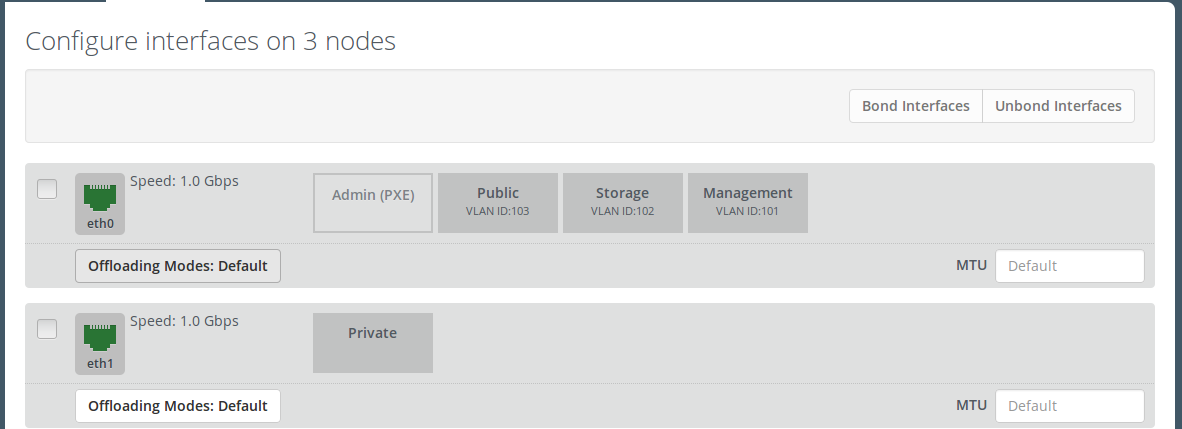
Next, we need to set gateway for the private network. Here is how to do it with Fuel CLI:
Login with ssh to Fuel master node.
List existing network-groups
fuel network-group --env 1
Remove and create again network-group private to set a gateway
fuel network-group --delete --network 5
fuel network-group --create --name private \
  --cidr 10.109.3.0/24 --gateway 10.109.3.1 --nodegroup 1
Set the
render_addr_maskparameter to internal for this network by typing:fuel network-group --set --network 6 --meta '{"name": "private", "notation": "cidr",\ "render_type": null, "map_priority": 2, "configurable": true, "use_gateway": true,\ "render_addr_mask": "internal", "vlan_start": null, "cidr": "10.109.3.0/24"}'Save sample
network templateUpload the network template by typing:
fuel --env 1 network-template --upload --dir /root/
Start deploy, pressing “Deploy changes” button.