6. DPDK-based vRouter
6.1. Description
The Data Plane Development Kit (DPDK) is a set of data plane libraries and network interface controller drivers for fast packet processing. The DPDK provides a programming framework for Intel x86 processors and enables faster development of high-speed data packet networking applications.
By default, contrail virtual router (vrouter) is running as a kernel module on Linux.
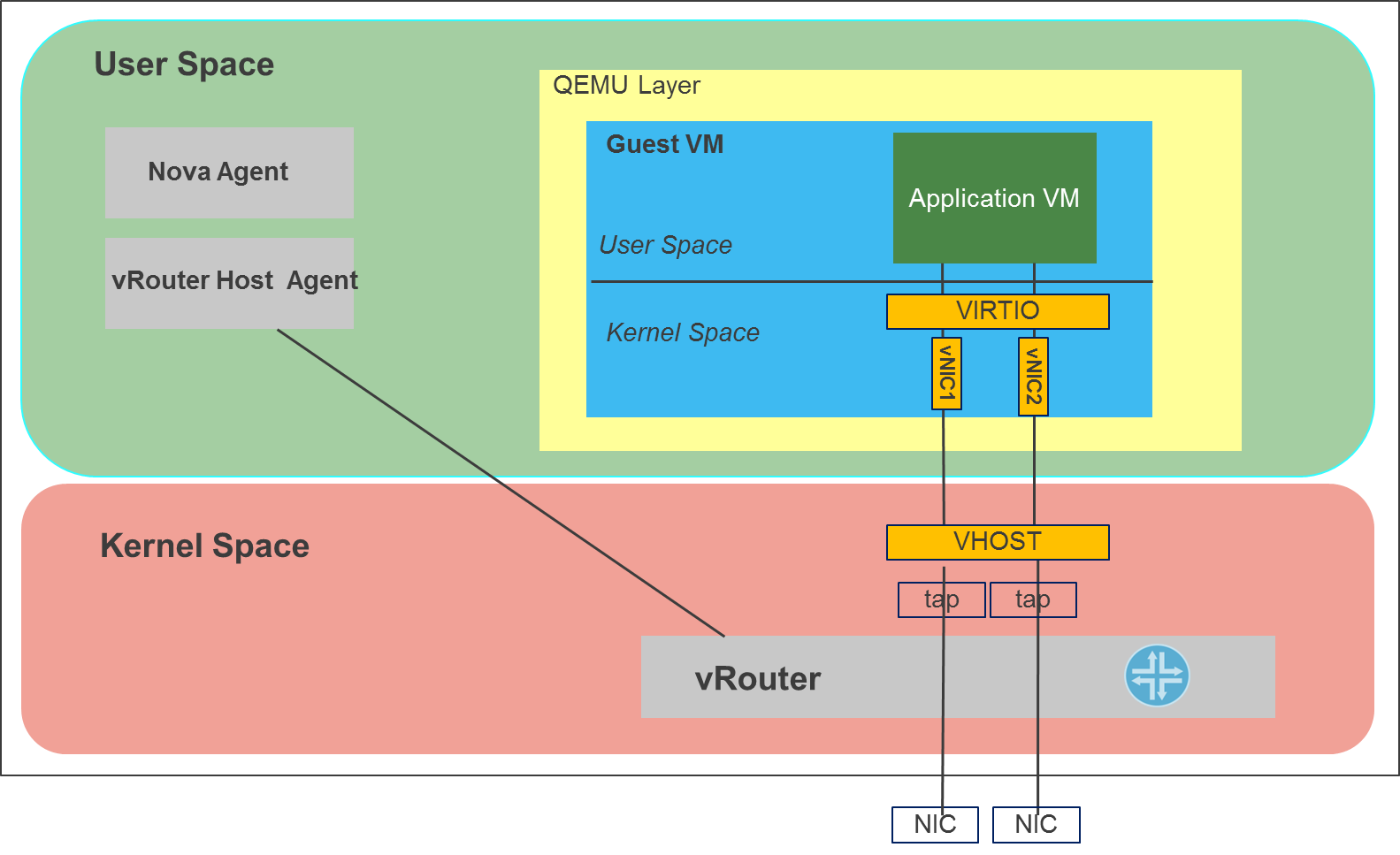
The vrouter module is able to fill a 10G link with TCP traffic from a virtual machine (VM) on one server to a VM on another server without making any assumptions about hardware capabilities in the server NICs. Also, in order to support interoperability and use a standards-based approach, vrouter does not use new protocols/encapsulations. However, in network function virtualization (NFV) scenarios, other performance metrics such as packets-per-second (pps) and latency are as important as TCP bandwidth. With a kernel module, the pps number is limited by various factors such as the number of VM exits, memory copies and the overhead of processing interrupts.
In order to optimize performance for NFV use cases, vrouter can be integrated with the Intel DPDK (Data Plane Development Kit). To integrate with DPDK, the vrouter can now run in a user process instead of a kernel module.
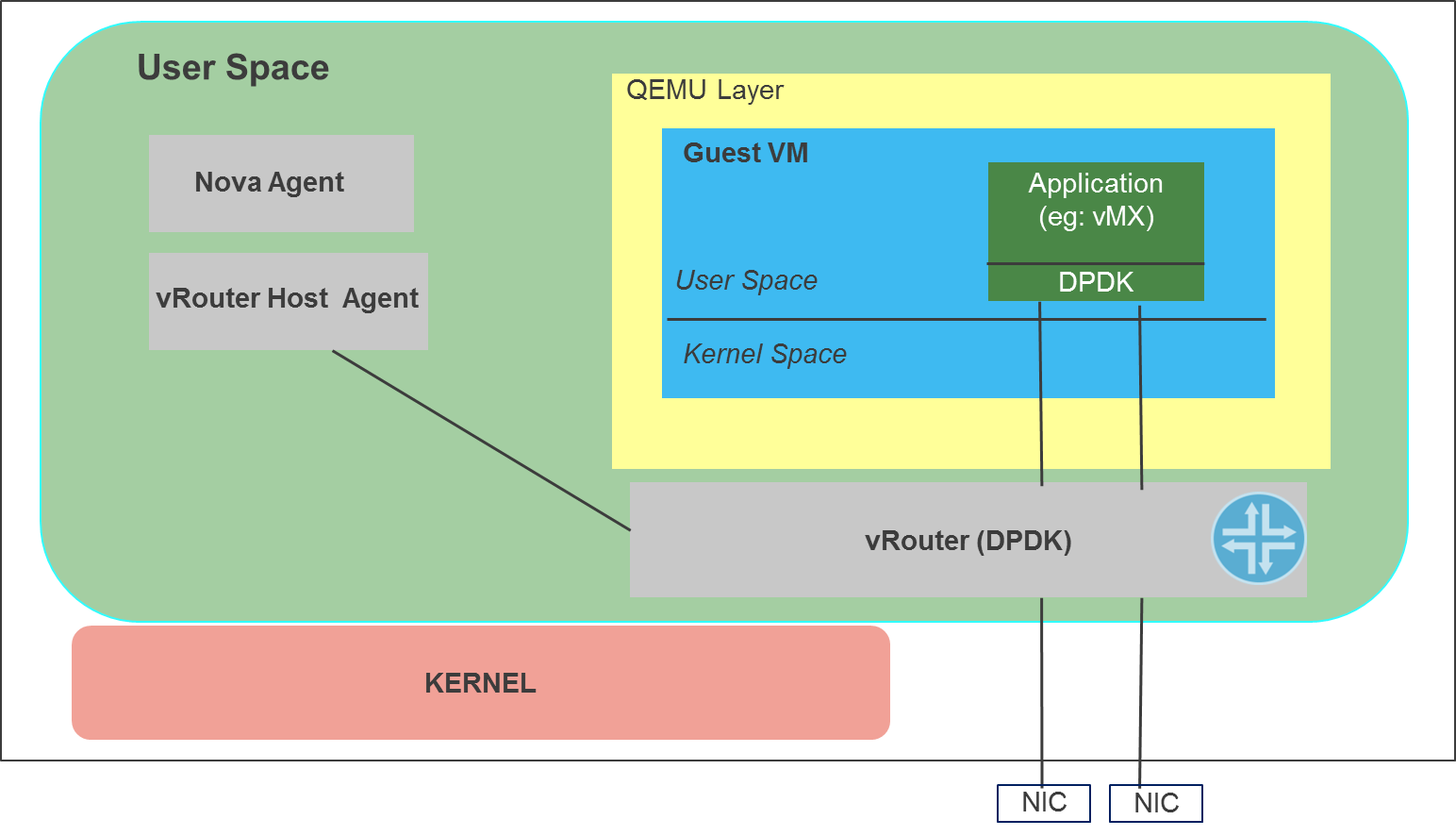
This process links with the DPDK libraries and communicates with the vrouter host agent, which runs as a separate process. The application inside the guest VM can be written to use the DPDK API or it can use the traditional socket API. However, for NFV applications such as vMX, which require high performance, it would be preferable to use the DPDK API inside the VM.
6.2. Prerequisites
- Installed Fuel 7.0
- Installed contrail plugin Installation Guide
- Environment must be created with “KVM” for compute virtualization and “Neutron with tunneling segmentation” for networking
- Network card must support DPDK. List of compatible adapters can be found on DPDK website
6.3. Restrictions
- Only compute hosts can be configured with DPDK role. “DPDK role” is just a mark that enables DPDK feature on certain compute. If you try to use it with other roles it wouldn’t have any effect.
- Contrail DPDK feature doesn’t work with qemu virtualization as far as with nested KVM. This means that for current release DPDK-based vRouter works only on baremetal computes.
- Contrail DPDK vrouter permanently uses 1GB of hugepages, therefore, it is necessary to allocate enough amount of hugepages to run DPDK vrouter and VM’s(with DPDK) respectively.
6.4. Configuration
To enable DPDK you should proceed with following steps:
Enable contrail plugin in Fuel UI settings
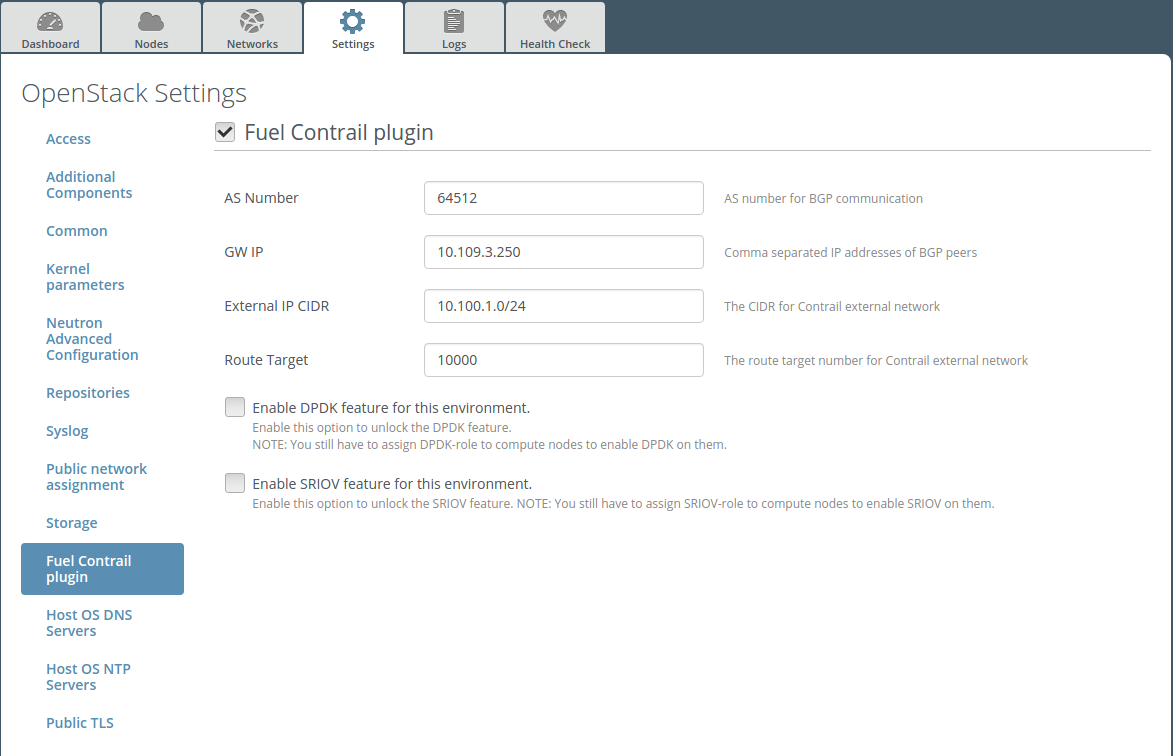
Enable DPDK on Fuel UI
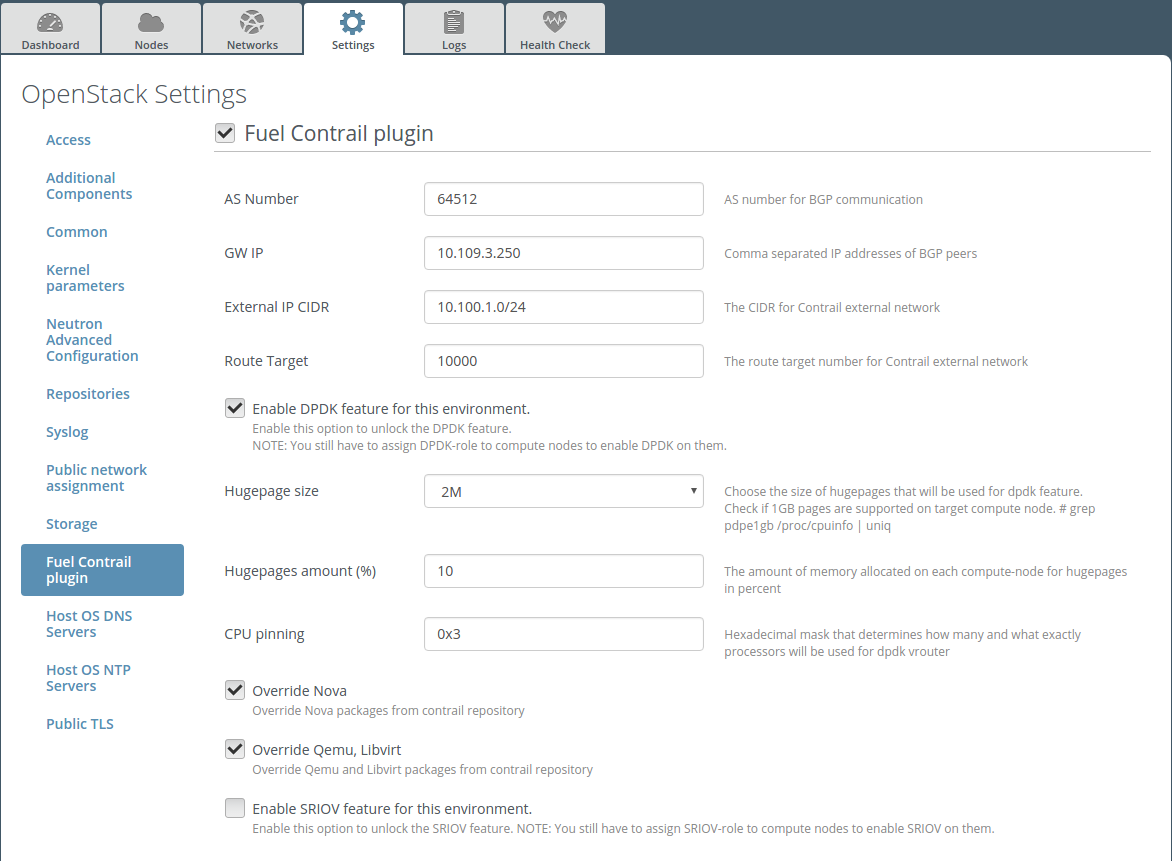
Choose the size and amount of huge pages to allocate. They will be used for both vRouter process and VMs backing. 2MB sized huge pages can be added on-fly, 1GB sized require a reboot. Also, it is necessary to leave some amount of memory for the operating system itself.
Add DPDK role on computes where you want to have DPDK-based vRouter. Computes that are not marked with DPDK role will use kernel-based vRouter.
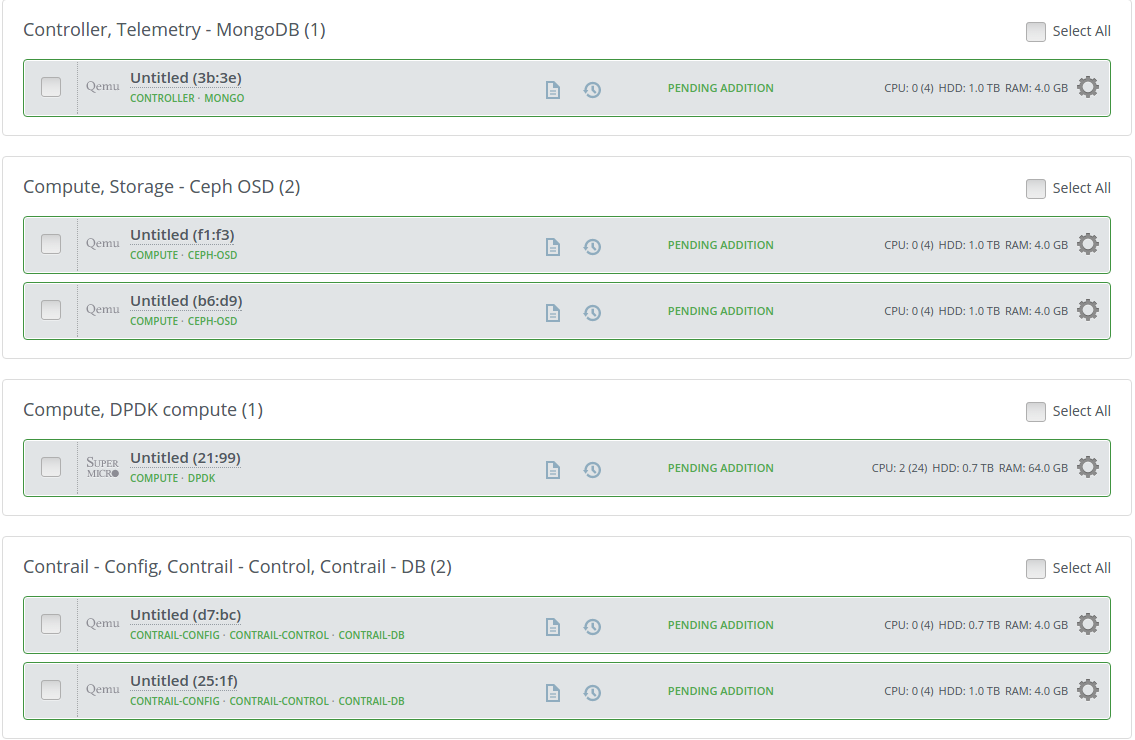
Deploy environment
Warning
Computes with DPDK-based vRouter require flavor with HugePages enabled. Instances with usual flavours can’t be launched on DPDK-enabled hosts.
If DPDK is enabled in plugin settings Fuel will create one flavor that will have hugepages support, named “m1.small.hpgs”. One can create custom flavor with following steps on controller node:
# . openrc
# nova flavor-create m2.small.hpgs auto 2000 20 2
# nova flavor-key m2.small.hpgs set hw:mem_page_size=large
# nova flavor-key m2.small.hpgs set aggregate_instance_extra_specs:hpgs=true
6.5. Verification
After deploy finishes, you can verify your installation. First, proceed with basic checks.
Check that Contrail services and DPDK vrouter are running on compute node:
root@node-37:~# contrail-status
== Contrail vRouter ==
supervisor-vrouter:           active
contrail-vrouter-agent        active
contrail-vrouter-dpdk         active
contrail-vrouter-nodemgr      active
Check if DPDK vrouter catch interface:
root@node-37:~# /opt/contrail/bin/dpdk_nic_bind.py -s
Network devices using DPDK-compatible driver
============================================
0000:06:00.0 '82599ES 10-Gigabit SFI/SFP+ Network Connection' drv=igb_uio unused=
Network devices using kernel driver
===================================
0000:02:00.0 'I350 Gigabit Network Connection' if=eth0 drv=igb unused=igb_uio
0000:02:00.1 'I350 Gigabit Network Connection' if=eth1 drv=igb unused=igb_uio
0000:06:00.1 '82599ES 10-Gigabit SFI/SFP+ Network Connection' if=eth3 drv=ixgbe   unused=igb_uio
Other network devices
=====================
<none>
Check if vrouter use hugepages:
root@node-37:~# grep Huge /proc/meminfo
AnonHugePages:         0 kB
HugePages_Total:   30000
HugePages_Free:    29488
HugePages_Rsvd:        0
HugePages_Surp:        0
Hugepagesize:       2048 kB
Check if vrouter utilize CPU:

Check if vrouter create interface after creation VM:
root@node-41:~# vif --list
Vrouter Interface Table
Flags: P=Policy, X=Cross Connect, S=Service Chain, Mr=Receive Mirror
       Mt=Transmit Mirror, Tc=Transmit Checksum Offload, L3=Layer 3, L2=Layer 2
       D=DHCP, Vp=Vhost Physical, Pr=Promiscuous, Vnt=Native Vlan Tagged
       Mnp=No MAC Proxy, Dpdk=DPDK PMD Interface, Rfl=Receive Filtering Offload
       Mon=Interface is Monitored, Uuf=Unknown Unicast Flood, Vof=VLAN insert/strip offload
vif0/0      PCI: 0:0:0.0 (Speed 10000, Duplex 1)
            Type:Physical HWaddr:00:1b:21:87:21:98 IPaddr:0
            Vrf:0 Flags:L3L2Vp MTU:1514 Ref:14
            RX device packets:3671  bytes:513937 errors:10
            RX port   packets:3671 errors:0
            RX queue  packets:6 errors:0
            RX queue errors to lcore 0 0 0 0 0 0 0 0 0 0 0 0
            RX packets:3671  bytes:499253 errors:0
            TX packets:4049  bytes:2135246 errors:0
            TX port   packets:4049 errors:0
            TX device packets:4049  bytes:2135246 errors:0
vif0/1      Virtual: vhost0
            Type:Host HWaddr:00:1b:21:87:21:98 IPaddr:0
            Vrf:0 Flags:L3L2 MTU:1514 Ref:8
            RX port   packets:4111 errors:0
            RX queue  packets:4093 errors:0
            RX queue errors to lcore 0 0 0 0 0 0 0 0 0 0 0 0
            RX packets:4111  bytes:2143597 errors:0
            TX packets:3786  bytes:509223 errors:0
            TX queue  packets:790 errors:0
            TX port   packets:3771 errors:0
vif0/2      Socket: unix
            Type:Agent HWaddr:00:00:5e:00:01:00 IPaddr:0
            Vrf:65535 Flags:L3 MTU:1514 Ref:2
            RX port   packets:45 errors:0
            RX queue errors to lcore 0 0 0 0 0 0 0 0 0 0 0 0
            RX packets:45  bytes:4322 errors:3
            TX packets:951  bytes:95940 errors:0
            TX queue  packets:951 errors:0
            TX port   packets:951 errors:0 syscalls:951
vif0/3      Ethernet: veth1404577d-b
            Type:Virtual HWaddr:00:00:5e:00:01:00 IPaddr:0
            Vrf:2 Flags:PL3L2D MTU:9160 Ref:11
            RX port   packets:31 errors:0
            RX queue  packets:24 errors:0
            RX queue errors to lcore 0 0 0 0 0 0 0 0 0 0 0 0
            RX packets:31  bytes:18164 errors:0
            TX packets:19  bytes:1091 errors:4
            TX queue  packets:14 errors:0
            TX port   packets:15 errors:0
6.7. How to change huge pages settings after deployment
After deploy is finished, plugin settigs are locked in Fuel UI. Therefore, huge pages size/ammount cannot be changed by plug-in, and should be changed manually on each compute node. Here are the nessesary steps:
2MB-sized huge pages are set with sysctl and can be added on fly with this command:
# sysctl -w vm.nr_hugepages=<number of pages>
Here number of huge pages can be calculated from ammount that you want to be set, for example 20GB = 20 * 1024 / 2 = 10240 pieces. Then edit the /etc/sysctl.conf file to make these changes persistent over reboots.
1GB-sized huge pages are set through the kernel parameter and require a reboot to take effect. Kernel versions supplied with Ubuntu 14.04 don’t support on fly allocation for 1GB-sized huge pages. First, edit the /etc/default/grub file and set needed amount of huge pages. Here is the example for GRUB_CMDLINE_LINUX in /etc/default/grub:
GRUB_CMDLINE_LINUX="$GRUB_CMDLINE_LINUX hugepagesz=1024M hugepages=20
Then update the bootloader and reboot for these parameters to take effect:
# update-grub
# reboot