10. Use network templates
Starting from Fuel 7.0, you can reduce the number of logical networks using network templates.
See also
This document provides a sample configuration with a network template to get customers up and running quickly.
The provided template utilizes three networks: Admin (PXE), Public, and Private.
To use the network template:
Perform steps 5.3.1 - 5.3.7 from Installation Guide
Configure interfaces as shown on figure:
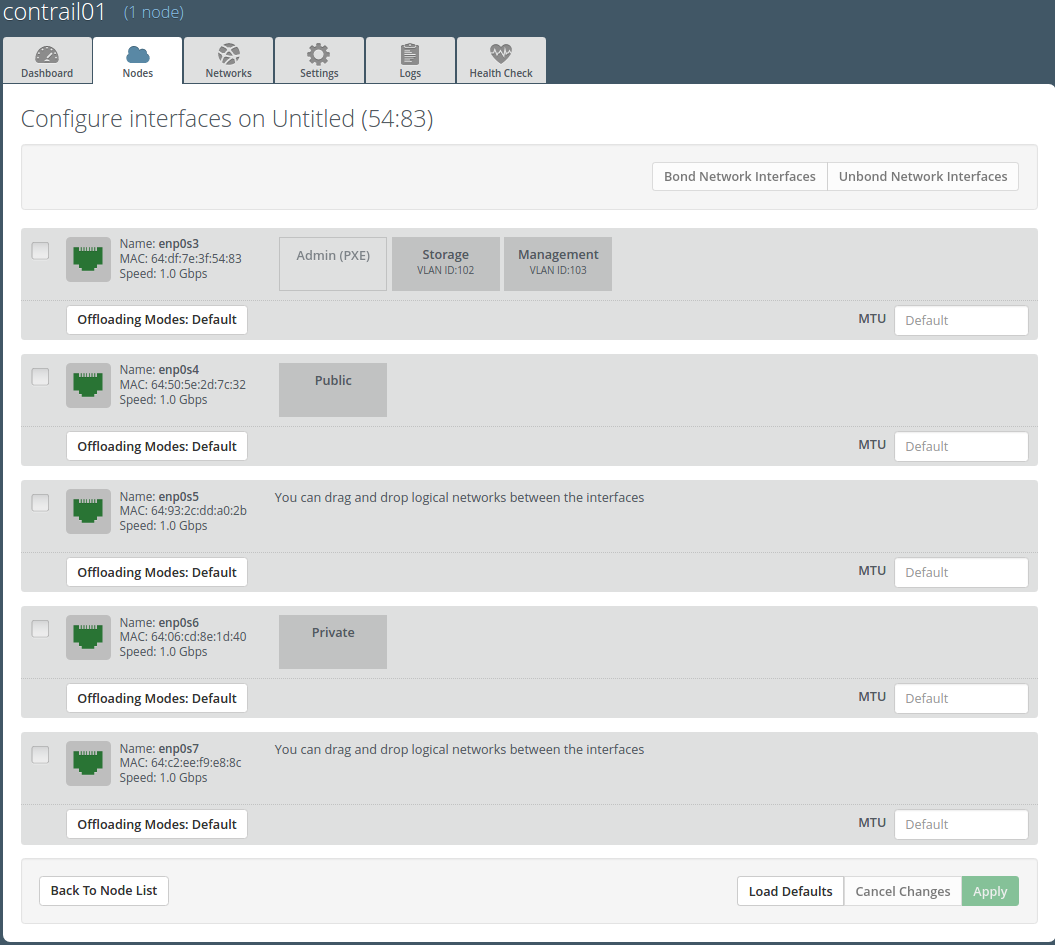
Set a gateway for the private network:
Login with ssh to Fuel master node.
- List existing network-groups:
fuel network-group --env 1
- Remove and create again network-group
privateto set a gateway: fuel network-group --delete --network 5 fuel network-group --create --name private \ --cidr 10.109.3.0/24 --gateway 10.109.3.1 --nodegroup 1
- Remove and create again network-group
Set the
render_addr_maskparameter tointernalfor this network by typing:fuel network-group --set --network 6 \ --meta '{"name": "private", "notation": "cidr",\ "render_type": null, "map_priority": 2, \ "configurable": true, "use_gateway": true,\ "render_addr_mask": "internal", "vlan_start": null, \ "cidr": "10.109.3.0/24"}'Save sample
network templateUpload the network template by typing:
fuel --env 1 network-template --upload --dir /root/
Start deployment by pressing Deploy changes button.