7. DPDK-based vRouter on virtual function (VF) (experimental)
7.1. Description
This guide describes how to run DPDK-based vRouter on virtual functions (VF). DPDK on VF depends on Enable SR-IOV and DPDK-based vRouter features. This feature shares a physical interface for DPDK and SR-IOV usage.
7.2. Prerequisites
- Installed Fuel 8.0
- Installed Fuel Contrail Plugin Installation Guide
- Environment must be created with “KVM” for compute virtualization and “Contrail” for networking
- Network card must support DPDK. List of compatible adapters can be found on DPDK website
- Network card must support SRIOV.
7.3. How to enable DPDK on VF
Enable DPDK feature DPDK-based vRouter.
Enable SRIOV feature Enable SR-IOV.
Enable DPDK on VF in Fuel UI settings:
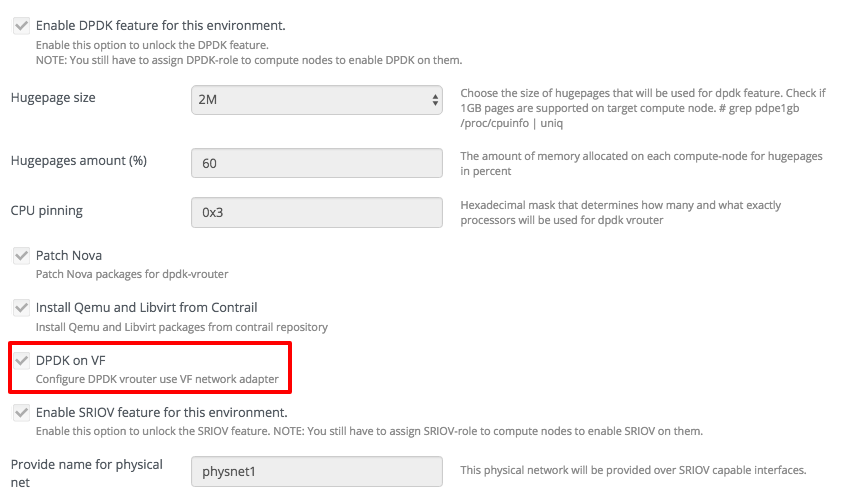
Assign
Compute,DPDK, andSRIOVroles to the host where you want to enable DPDK on VF feature:
Deploy environment
If DPDK on VF is enabled in plugin settings, it will be deployed on computes with DPDK
and SR-IOV roles.
During deploy following configurations will be made on compute nodes with DPDK and SR-IOV roles:
- Virtual functions will be allocated on private interface.
- First VF (dpdk-vf0) will be used for DPDK-based vRouter.
- Rest of the VFs will be added to
pci_passthrough_whitelistsetting innova.conffor SR-IOV usage.